---
head:
- - meta
- name: description
content: Use Socket.io with Express, TypeScript and Ts.ED. Socket.io enable real-time bidirectional event-based communication. It works on every platform, browser or device, focusing equally on reliability and speed.
- - meta
- name: keywords
content: ts.ed express typescript socket.io websocket node.js javascript decorators
projects:
- title: Kit Socket.io
href: https://github.com/tsedio/tsed-example-socketio
src: /socketio.png
---
# Socket.io
Socket.io enables real-time bidirectional event-based communication. It works on every platform, browser or device, focusing equally on reliability and speed.
## Installation
Before using Socket.io, we need to install the [Socket.io](https://www.npmjs.com/package/socket.io) module.
::: code-group
```sh [npm]
npm install --save socket.io @types/socket.io @tsed/socketio
npm install --save-dev @tsed/socketio-testing
```
```sh [yarn]
yarn add socket.io @types/socket.io @tsed/socketio
yarn add --dev @tsed/socketio-testing
```
```sh [pnpm]
pnpm add socket.io @types/socket.io @tsed/socketio
pnpm add -D @tsed/socketio-testing
```
```sh [bun]
bun add socket.io @types/socket.io @tsed/socketio
bun add --dev @tsed/socketio-testing
```
:::
Then add the following configuration in your server [Configuration](/docs/configuration/index):
```ts
import "@tsed/platform-express";
import "@tsed/socketio"; // import socket.io Ts.ED module
import {Configuration} from "@tsed/di";
@Configuration({
socketIO: {
// ... see configuration
}
})
export class Server {}
```
## Configuration
- `path`: name of the path to capture (/socket.io).
- `serveClient`: whether to serve the client files (true).
- `adapter`: the adapter to use. Defaults to an instance of the Adapter that ships with Socket.io which is memory based. See [socket.io-adapter](https://github.com/socketio/socket.io-adapter).
- `cors`: Cors configuration.
- `parser`: the parser to use. Defaults to an instance of the Parser that ships with Socket.io. See [socket.io-parser](https://github.com/socketio/socket.io-parser).
For more information see [Socket.io documentation](https://socket.io/docs/v4/server-api)
## Socket Service
> Socket.io allows you to “namespace” your sockets, which essentially means assigning different endpoints or paths.
> This is a useful feature to minimize the number of resources (TCP connections) and at the same time separate concerns within your application
> by introducing separation between communication channels. See [namespace documentation](https://socket.io/docs/v4/namespaces/).
All Socket service work under a namespace, and you can create one Socket service per namespace.
Example:
```ts
import {IO, Nsp, Reason, Socket, SocketService, SocketSession} from "@tsed/socketio";
import * as SocketIO from "socket.io";
@SocketService("/my-namespace")
export class MySocketService {
@Nsp nsp: SocketIO.Namespace;
@Nsp("/my-other-namespace")
nspOther: SocketIO.Namespace; // communication between two namespace
constructor(@IO private io: SocketIO.Server) {}
/**
* Triggered the namespace is created
*/
$onNamespaceInit(nsp: SocketIO.Namespace) {}
/**
* Triggered when a new client connects to the Namespace.
*/
$onConnection(@Socket socket: SocketIO.Socket, @SocketSession session: SocketSession) {}
/**
* Triggered when a client disconnects from the Namespace.
*/
$onDisconnect(@Socket socket: SocketIO.Socket, @Reason reason: string) {}
}
```
> [SocketService](/ai/api/third-parties/socketio/types/decorators/decorator-socket-service.md) inherits from [Service](/ai/api/di/types/common/decorators/decorator-service.md) decorator, meaning a SocketService can be injected to another Service, Controller or Middleware.
Example:
```ts
import {Namespace, SocketService} from "@tsed/socketio";
@SocketService()
export class MySocketService {
@Namespace nsp: Namespace;
helloAll() {
this.nsp.emit("hi", "everyone!");
}
}
```
Then, you can inject your socket service into another Service, Controller, etc. as following:
```ts
import {Controller} from "@tsed/di";
import {Get} from "@tsed/schema";
import {MySocketService} from "../services/MySocketService";
@Controller("/")
export class MyCtrl {
constructor(private mySocketService: MySocketService) {}
@Get("/allo")
allo() {
this.mySocketService.helloAll();
return "is sent";
}
}
```
### Dynamic Namespaces
> Socket.io [dynamic namespaces](https://socket.io/docs/v4/namespaces/#dynamic-namespaces) can be implemented using [SocketService](/ai/api/third-parties/socketio/types/decorators/decorator-socket-service.md), [Namespace](/ai/api/third-parties/socketio/types/decorators/type-namespace.md) and [Nsp](/ai/api/third-parties/socketio/types/decorators/type-nsp.md)
```ts
import {Input, Nsp, SocketNsp, SocketService} from "@tsed/socketio";
import * as SocketIO from "socket.io";
@SocketService(/my-namespace-.+/)
export class MySocketService {
// This will be the parent namespace.
@Nsp nsp: SocketIO.Namespace;
@Input("eventName")
async myMethod(@SocketNsp nsp: SocketNsp) {
// nsp is the actual namespace of this call.
}
}
```
### Declaring an Input Event
[Input](/ai/api/third-parties/socketio/types/decorators/decorator-input.md) decorator declares a method as a new handler for a specific `event`.
```ts
import {Args, Input, Namespace, Socket, SocketService} from "@tsed/socketio";
@SocketService("/my-namespace")
export class MySocketService {
@Input("eventName")
myMethod(@Args(0) userName: string, @Socket socket: Socket, @Namespace nsp: Namespace) {
console.log(userName);
}
}
```
- [Args](/ai/api/third-parties/socketio/types/decorators/decorator-args.md) \: List of the parameters sent by the input event.
- [Socket](/ai/api/third-parties/socketio/types/decorators/type-socket.md) \: Socket instance.
- [Namespace](/ai/api/third-parties/socketio/types/decorators/type-namespace.md) <[SocketIO.Namespace](https://socket.io/docs/v4/namespaces/)>: Namespace instance.
- [Nsp](/ai/api/third-parties/socketio/types/decorators/type-nsp.md) <[SocketIO.Namespace](https://socket.io/docs/rooms-and-namespaces/#)>: Namespace instance.
- [SocketNsp](/ai/api/third-parties/socketio/types/decorators/type-socket-nsp.md) <[SocketIO.Namespace](https://socket.io/docs/v4/namespaces/)>: Namespace instance from socket.
### Send a response
You have many choices to send a response to your client. Ts.ED offers some decorators to send a response:
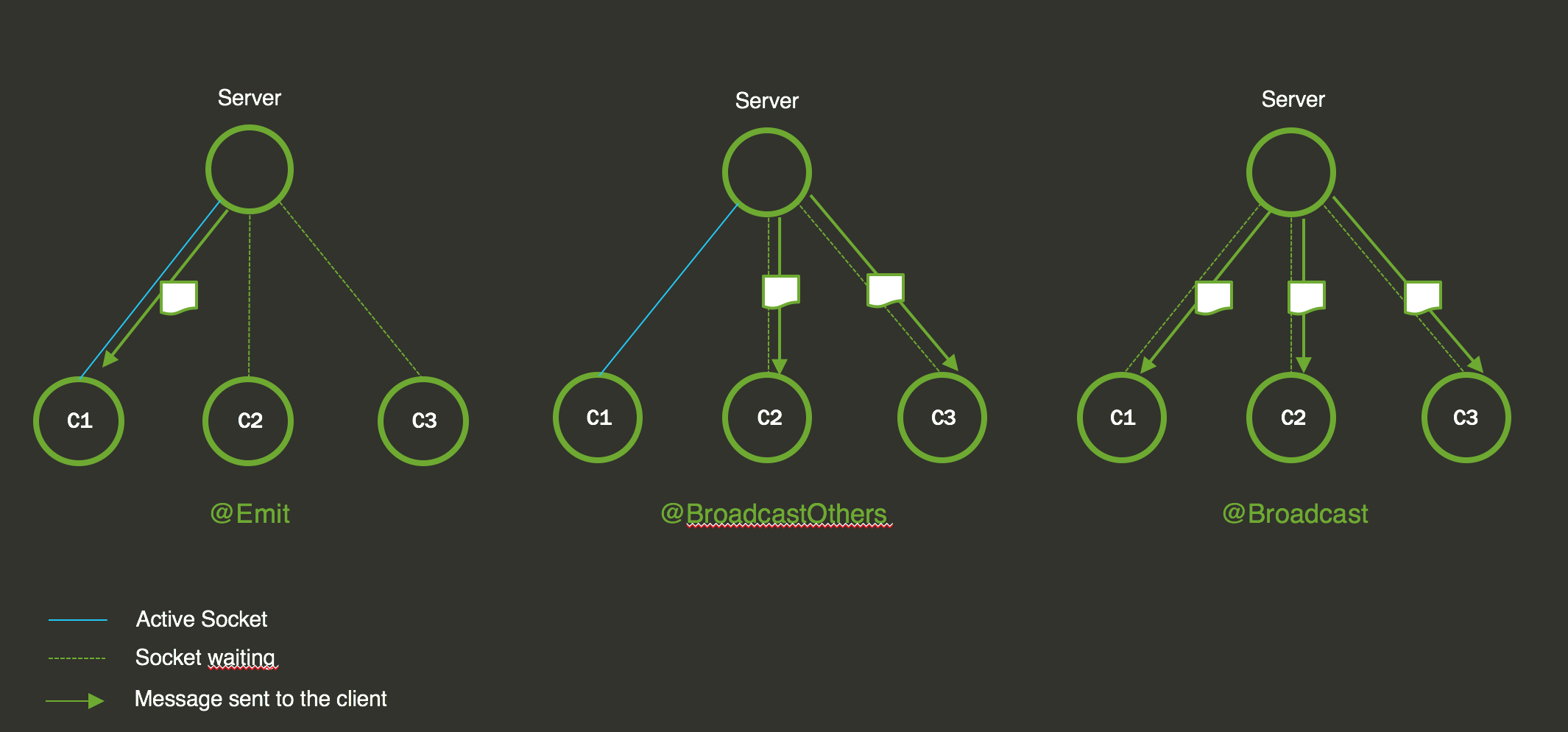 Example:
```ts
import {Args, Emit, Input, Socket, SocketService} from "@tsed/socketio";
@SocketService("/my-namespace")
export class MySocketService {
@Input("eventName")
@Emit("responseEventName") // or Broadcast or BroadcastOthers
async myMethod(@Args(0) userName: string, @Socket socket: Socket) {
return "Message " + userName;
}
}
```
::: tip
All methods accept a promise as returned value. Ts.ED handles promise before returning a response to your consumer.
:::
::: warning
Return value is only possible when the method is decorated by [Emit](/ai/api/third-parties/socketio/types/decorators/decorator-emit.md), [Broadcast](/ai/api/third-parties/socketio/types/decorators/decorator-broadcast.md) and [BroadcastOthers](/ai/api/third-parties/socketio/types/decorators/decorator-broadcast-others.md).
:::
Since v7.59.0, you can omit the `@Emit` decorator. Ts.ED will automatically emit the returned value using the callback function
given by Socket.io.
Example:
```ts
import {Args, Emit, Input, Socket, SocketService} from "@tsed/socketio";
@SocketService("/my-namespace")
export class MySocketService {
@Input("eventName")
async myMethod(@Args(0) userName: string) {
return "Message " + userName;
}
}
```
### Socket Session
Ts.ED creates a new session for each socket.
```ts
import {Args, Emit, Input, SocketService, SocketSession} from "@tsed/socketio";
@SocketService("/my-namespace")
export class MySocketService {
@Input("eventName")
@Emit("responseEventName") // or Broadcast or BroadcastOthers
async myMethod(@Args(0) userName: string, @SocketSession session: SocketSession) {
const user = session.get("user") || {};
user.name = userName;
session.set("user", user);
return user;
}
}
```
The session represents an arbitrary object that facilitates the storage of session data, allowing the sharing of information between Socket.IO servers.
In the event of an unexpected disconnection (i.e., when the socket is not manually disconnected using `socket.disconnect()`), the server will store the session of the socket. Upon reconnection, the server will make an attempt to restore the previous session.
To enable this behavior, you need to configure the [Connection state recovery](https://socket.io/docs/v4/connection-state-recovery) as follows:
```ts
import "@tsed/platform-express";
import "@tsed/socketio";
import {Configuration} from "@tsed/di";
@Configuration({
socketIO: {
// ... see configuration
connectionStateRecovery: {
// the backup duration of the sessions and the packets
maxDisconnectionDuration: 2 * 60 * 1000,
// whether to skip middlewares upon successful recovery
skipMiddlewares: true
}
}
})
export class Server {}
```
::: tip
By default, Ts.ED uses the built-in in-memory adapter for session management. However, for production environments, it is recommended to use [the persistent adapters](https://socket.io/docs/v4/connection-state-recovery#compatibility-with-existing-adapters) to enhance reliability.
:::
### Middlewares
A middleware can also be used on a [SocketService](/ai/api/third-parties/socketio/types/decorators/decorator-socket-service.md) either on a class or on a method.
Here is an example of a middleware:
```ts
import {deserialize} from "@tsed/json-mapper";
import {Args, SocketMiddleware} from "@tsed/socketio";
import {User} from "../models/User";
@SocketMiddleware()
export class UserConverterSocketMiddleware {
async use(@Args() args: any[]) {
let [user] = args;
// update Arguments
user = deserialize(user, {type: User, useAlias: true});
return [user];
}
}
```
::: tip
The user instance will be forwarded to the next middleware and to your decorated method.
:::
You can also declare a middleware to handle an error with [SocketMiddlewareError](/ai/api/third-parties/socketio/types/decorators/decorator-socket-middleware-error.md).
Here is an example:
```ts
import {Socket, SocketErr, SocketEventName, SocketMiddlewareError} from "@tsed/socketio";
@SocketMiddlewareError()
export class ErrorHandlerSocketMiddleware {
async use(@SocketEventName eventName: string, @SocketErr err: any, @Socket socket: Socket) {
console.error(err);
socket.emit("error", {message: "An error has occured"});
}
}
```
Two decorators are provided to attach your middleware on the right place:
- [SocketUseBefore](/ai/api/third-parties/socketio/types/decorators/decorator-socket-use-before.md) will call your middleware before the class method,
- [SocketUseAfter](/ai/api/third-parties/socketio/types/decorators/decorator-socket-use-after.md) will call your middleware after the class method.
Both decorators can be used as a class decorator or as a method decorator.
The call sequence is the following for each event request:
- Middlewares attached with [SocketUseBefore](/ai/api/third-parties/socketio/types/decorators/decorator-socket-use-before.md) on class,
- Middlewares attached with [SocketUseBefore](/ai/api/third-parties/socketio/types/decorators/decorator-socket-use-before.md) on method,
- The method,
- Send response if the method is decorated with [Emit](/ai/api/third-parties/socketio/types/decorators/decorator-emit.md), [Broadcast](/ai/api/third-parties/socketio/types/decorators/decorator-broadcast.md) or [BroadcastOthers](/ai/api/third-parties/socketio/types/decorators/decorator-broadcast-others.md),
- Middlewares attached with [SocketUseAfter](/ai/api/third-parties/socketio/types/decorators/decorator-socket-use-after.md) on method,
- Middlewares attached with [SocketUseAfter](/ai/api/third-parties/socketio/types/decorators/decorator-socket-use-after.md) on class.
Middlewares chain uses the `Promise` to run it. If one of this middlewares/method emits an error, the first middleware error will be called.
```ts
import {Args, Emit, Input, SocketService, SocketUseAfter, SocketUseBefore} from "@tsed/socketio";
import {ErrorHandlerSocketMiddleware, UserConverterSocketMiddleware} from "../middlewares";
import {User} from "../models/User";
@SocketService("/my-namespace")
@SocketUseBefore(UserConverterSocketMiddleware) // global version
@SocketUseAfter(ErrorHandlerSocketMiddleware)
export class MySocketService {
@Input("eventName")
@Emit("responseEventName") // or Broadcast or BroadcastOthers
@SocketUseBefore(UserConverterSocketMiddleware)
@SocketUseAfter(ErrorHandlerSocketMiddleware)
async myMethod(@Args(0) user: User) {
console.log(user);
return user;
}
}
```
## Decorators
## Connecting the client
Once you have the socket set up on the server, you will want to connect up your client. Here are a few examples based on different configurations and namespaces.
### With default config
With this in your server configuration
```typescript
@Configuration({
socketIO: {} // uses all default values
})
```
And this in your service
```ts
import {IO, Nsp, Socket, SocketService, SocketSession} from "@tsed/socketio";
import * as SocketIO from "socket.io";
@SocketService("/my-socket-namespace")
export class MySocketService {
@Nsp nsp: SocketIO.Namespace;
// a map to keep clients by any id you like, a userId or whatever.
public clients: Map = new Map();
constructor(@IO private io: SocketIO.Server) {}
/**
* Triggered when a new client connects to the Namespace.
*/
$onConnection(@Socket socket: SocketIO.Socket, @SocketSession session: SocketSession) {
console.log("===== CONNECTED A CLIENT =====");
console.log(`===== SOCKET ID ${socket.id} =====`);
this.clients.set(socket.id, socket);
// if you pass in a query of some kind you could use an id passed from the front end
// instead of the socket id, like this.
const yourId: string | undefined = socket.handshake.query.yourId?.toString();
if (yourId) this.clients.set(yourId, socket);
}
// setup a method to send data to all clients
// you can use this from any other service or controller.
broadcast(someData: any): void {
this.nsp.emit("event_name", someData);
}
// method to send to a targeted client
sendToSingleClient(idToSendTo: string, someData: any): void {
const socket = this.clients.get(idToSendTo);
if (!socket) return;
socket.emit("eventName", someData);
}
}
```
In plain javascript you could connect like this.
```html
Socket Test
```
## Testing
To test your Socket.io service, you can use the `@tsed/socketio-testing` package.
::: code-group
```typescript [Jest]
import {Inject} from "@tsed/di";
import {PlatformTest} from "@tsed/platform-http/testing";
import {PlatformExpress} from "@tsed/platform-express";
import {Emit, Input, SocketIOServer, SocketService, SocketSession, SocketUseBefore} from "@tsed/socketio";
import {SocketClientService} from "@tsed/socketio-testing";
import {Namespace, Socket as IOSocket} from "socket.io";
import {Server} from "./app/Server";
@SocketService("/test")
export class TestWS {
@Inject()
private io: SocketIOServer;
$onConnection(socket: IOSocket, nsp: Namespace) {}
$onDisconnect(socket: IOSocket, nsp: Namespace) {}
@Input("input:scenario1")
@Emit("output:scenario1")
async scenario1() {
return "My message";
}
}
describe("Socket integration", () => {
beforeAll(
PlatformTest.bootstrap(Server, {
adapter: PlatformExpress,
listen: true,
httpPort: 8999,
imports: [TestWS]
})
);
afterAll(PlatformTest.reset);
describe("RoomWS: eventName", () => {
it("should return the data", async () => {
const service = PlatformTest.get(SocketClientService);
const client = await service.get("/test");
const client2 = await service.get("/test");
expect(client).toEqual(client2);
return new Promise((resolve) => {
client.on("output:scenario1", (result) => {
expect(result).toEqual("My message");
resolve();
});
client.emit("input:scenario1");
});
});
});
});
```
```typescript [Vitest]
import {Inject} from "@tsed/di";
import {PlatformTest} from "@tsed/platform-http/testing";
import {PlatformExpress} from "@tsed/platform-express";
import {Emit, Input, SocketIOServer, SocketService, SocketSession, SocketUseBefore} from "@tsed/socketio";
import {SocketClientService} from "@tsed/socketio-testing";
import {Namespace, Socket as IOSocket} from "socket.io";
import {Server} from "./app/Server.js";
@SocketService("/test")
export class TestWS {
@Inject()
private io: SocketIOServer;
$onConnection(socket: IOSocket, nsp: Namespace) {}
$onDisconnect(socket: IOSocket, nsp: Namespace) {}
@Input("input:scenario1")
@Emit("output:scenario1")
async scenario1() {
return "My message";
}
}
describe("Socket integration", () => {
beforeAll(
PlatformTest.bootstrap(Server, {
adapter: PlatformExpress,
listen: true,
httpPort: 8999,
imports: [TestWS]
})
);
afterAll(PlatformTest.reset);
describe("RoomWS: eventName", () => {
it("should return the data", async () => {
const service = PlatformTest.get(SocketClientService);
const client = await service.get("/test");
const client2 = await service.get("/test");
expect(client).toEqual(client2);
return new Promise((resolve) => {
client.on("output:scenario1", (result) => {
expect(result).toEqual("My message");
resolve();
});
client.emit("input:scenario1");
});
});
});
});
```
:::
## Author
## Maintainers
Example:
```ts
import {Args, Emit, Input, Socket, SocketService} from "@tsed/socketio";
@SocketService("/my-namespace")
export class MySocketService {
@Input("eventName")
@Emit("responseEventName") // or Broadcast or BroadcastOthers
async myMethod(@Args(0) userName: string, @Socket socket: Socket) {
return "Message " + userName;
}
}
```
::: tip
All methods accept a promise as returned value. Ts.ED handles promise before returning a response to your consumer.
:::
::: warning
Return value is only possible when the method is decorated by [Emit](/ai/api/third-parties/socketio/types/decorators/decorator-emit.md), [Broadcast](/ai/api/third-parties/socketio/types/decorators/decorator-broadcast.md) and [BroadcastOthers](/ai/api/third-parties/socketio/types/decorators/decorator-broadcast-others.md).
:::
Since v7.59.0, you can omit the `@Emit` decorator. Ts.ED will automatically emit the returned value using the callback function
given by Socket.io.
Example:
```ts
import {Args, Emit, Input, Socket, SocketService} from "@tsed/socketio";
@SocketService("/my-namespace")
export class MySocketService {
@Input("eventName")
async myMethod(@Args(0) userName: string) {
return "Message " + userName;
}
}
```
### Socket Session
Ts.ED creates a new session for each socket.
```ts
import {Args, Emit, Input, SocketService, SocketSession} from "@tsed/socketio";
@SocketService("/my-namespace")
export class MySocketService {
@Input("eventName")
@Emit("responseEventName") // or Broadcast or BroadcastOthers
async myMethod(@Args(0) userName: string, @SocketSession session: SocketSession) {
const user = session.get("user") || {};
user.name = userName;
session.set("user", user);
return user;
}
}
```
The session represents an arbitrary object that facilitates the storage of session data, allowing the sharing of information between Socket.IO servers.
In the event of an unexpected disconnection (i.e., when the socket is not manually disconnected using `socket.disconnect()`), the server will store the session of the socket. Upon reconnection, the server will make an attempt to restore the previous session.
To enable this behavior, you need to configure the [Connection state recovery](https://socket.io/docs/v4/connection-state-recovery) as follows:
```ts
import "@tsed/platform-express";
import "@tsed/socketio";
import {Configuration} from "@tsed/di";
@Configuration({
socketIO: {
// ... see configuration
connectionStateRecovery: {
// the backup duration of the sessions and the packets
maxDisconnectionDuration: 2 * 60 * 1000,
// whether to skip middlewares upon successful recovery
skipMiddlewares: true
}
}
})
export class Server {}
```
::: tip
By default, Ts.ED uses the built-in in-memory adapter for session management. However, for production environments, it is recommended to use [the persistent adapters](https://socket.io/docs/v4/connection-state-recovery#compatibility-with-existing-adapters) to enhance reliability.
:::
### Middlewares
A middleware can also be used on a [SocketService](/ai/api/third-parties/socketio/types/decorators/decorator-socket-service.md) either on a class or on a method.
Here is an example of a middleware:
```ts
import {deserialize} from "@tsed/json-mapper";
import {Args, SocketMiddleware} from "@tsed/socketio";
import {User} from "../models/User";
@SocketMiddleware()
export class UserConverterSocketMiddleware {
async use(@Args() args: any[]) {
let [user] = args;
// update Arguments
user = deserialize(user, {type: User, useAlias: true});
return [user];
}
}
```
::: tip
The user instance will be forwarded to the next middleware and to your decorated method.
:::
You can also declare a middleware to handle an error with [SocketMiddlewareError](/ai/api/third-parties/socketio/types/decorators/decorator-socket-middleware-error.md).
Here is an example:
```ts
import {Socket, SocketErr, SocketEventName, SocketMiddlewareError} from "@tsed/socketio";
@SocketMiddlewareError()
export class ErrorHandlerSocketMiddleware {
async use(@SocketEventName eventName: string, @SocketErr err: any, @Socket socket: Socket) {
console.error(err);
socket.emit("error", {message: "An error has occured"});
}
}
```
Two decorators are provided to attach your middleware on the right place:
- [SocketUseBefore](/ai/api/third-parties/socketio/types/decorators/decorator-socket-use-before.md) will call your middleware before the class method,
- [SocketUseAfter](/ai/api/third-parties/socketio/types/decorators/decorator-socket-use-after.md) will call your middleware after the class method.
Both decorators can be used as a class decorator or as a method decorator.
The call sequence is the following for each event request:
- Middlewares attached with [SocketUseBefore](/ai/api/third-parties/socketio/types/decorators/decorator-socket-use-before.md) on class,
- Middlewares attached with [SocketUseBefore](/ai/api/third-parties/socketio/types/decorators/decorator-socket-use-before.md) on method,
- The method,
- Send response if the method is decorated with [Emit](/ai/api/third-parties/socketio/types/decorators/decorator-emit.md), [Broadcast](/ai/api/third-parties/socketio/types/decorators/decorator-broadcast.md) or [BroadcastOthers](/ai/api/third-parties/socketio/types/decorators/decorator-broadcast-others.md),
- Middlewares attached with [SocketUseAfter](/ai/api/third-parties/socketio/types/decorators/decorator-socket-use-after.md) on method,
- Middlewares attached with [SocketUseAfter](/ai/api/third-parties/socketio/types/decorators/decorator-socket-use-after.md) on class.
Middlewares chain uses the `Promise` to run it. If one of this middlewares/method emits an error, the first middleware error will be called.
```ts
import {Args, Emit, Input, SocketService, SocketUseAfter, SocketUseBefore} from "@tsed/socketio";
import {ErrorHandlerSocketMiddleware, UserConverterSocketMiddleware} from "../middlewares";
import {User} from "../models/User";
@SocketService("/my-namespace")
@SocketUseBefore(UserConverterSocketMiddleware) // global version
@SocketUseAfter(ErrorHandlerSocketMiddleware)
export class MySocketService {
@Input("eventName")
@Emit("responseEventName") // or Broadcast or BroadcastOthers
@SocketUseBefore(UserConverterSocketMiddleware)
@SocketUseAfter(ErrorHandlerSocketMiddleware)
async myMethod(@Args(0) user: User) {
console.log(user);
return user;
}
}
```
## Decorators
## Connecting the client
Once you have the socket set up on the server, you will want to connect up your client. Here are a few examples based on different configurations and namespaces.
### With default config
With this in your server configuration
```typescript
@Configuration({
socketIO: {} // uses all default values
})
```
And this in your service
```ts
import {IO, Nsp, Socket, SocketService, SocketSession} from "@tsed/socketio";
import * as SocketIO from "socket.io";
@SocketService("/my-socket-namespace")
export class MySocketService {
@Nsp nsp: SocketIO.Namespace;
// a map to keep clients by any id you like, a userId or whatever.
public clients: Map = new Map();
constructor(@IO private io: SocketIO.Server) {}
/**
* Triggered when a new client connects to the Namespace.
*/
$onConnection(@Socket socket: SocketIO.Socket, @SocketSession session: SocketSession) {
console.log("===== CONNECTED A CLIENT =====");
console.log(`===== SOCKET ID ${socket.id} =====`);
this.clients.set(socket.id, socket);
// if you pass in a query of some kind you could use an id passed from the front end
// instead of the socket id, like this.
const yourId: string | undefined = socket.handshake.query.yourId?.toString();
if (yourId) this.clients.set(yourId, socket);
}
// setup a method to send data to all clients
// you can use this from any other service or controller.
broadcast(someData: any): void {
this.nsp.emit("event_name", someData);
}
// method to send to a targeted client
sendToSingleClient(idToSendTo: string, someData: any): void {
const socket = this.clients.get(idToSendTo);
if (!socket) return;
socket.emit("eventName", someData);
}
}
```
In plain javascript you could connect like this.
```html
Socket Test
```
## Testing
To test your Socket.io service, you can use the `@tsed/socketio-testing` package.
::: code-group
```typescript [Jest]
import {Inject} from "@tsed/di";
import {PlatformTest} from "@tsed/platform-http/testing";
import {PlatformExpress} from "@tsed/platform-express";
import {Emit, Input, SocketIOServer, SocketService, SocketSession, SocketUseBefore} from "@tsed/socketio";
import {SocketClientService} from "@tsed/socketio-testing";
import {Namespace, Socket as IOSocket} from "socket.io";
import {Server} from "./app/Server";
@SocketService("/test")
export class TestWS {
@Inject()
private io: SocketIOServer;
$onConnection(socket: IOSocket, nsp: Namespace) {}
$onDisconnect(socket: IOSocket, nsp: Namespace) {}
@Input("input:scenario1")
@Emit("output:scenario1")
async scenario1() {
return "My message";
}
}
describe("Socket integration", () => {
beforeAll(
PlatformTest.bootstrap(Server, {
adapter: PlatformExpress,
listen: true,
httpPort: 8999,
imports: [TestWS]
})
);
afterAll(PlatformTest.reset);
describe("RoomWS: eventName", () => {
it("should return the data", async () => {
const service = PlatformTest.get(SocketClientService);
const client = await service.get("/test");
const client2 = await service.get("/test");
expect(client).toEqual(client2);
return new Promise((resolve) => {
client.on("output:scenario1", (result) => {
expect(result).toEqual("My message");
resolve();
});
client.emit("input:scenario1");
});
});
});
});
```
```typescript [Vitest]
import {Inject} from "@tsed/di";
import {PlatformTest} from "@tsed/platform-http/testing";
import {PlatformExpress} from "@tsed/platform-express";
import {Emit, Input, SocketIOServer, SocketService, SocketSession, SocketUseBefore} from "@tsed/socketio";
import {SocketClientService} from "@tsed/socketio-testing";
import {Namespace, Socket as IOSocket} from "socket.io";
import {Server} from "./app/Server.js";
@SocketService("/test")
export class TestWS {
@Inject()
private io: SocketIOServer;
$onConnection(socket: IOSocket, nsp: Namespace) {}
$onDisconnect(socket: IOSocket, nsp: Namespace) {}
@Input("input:scenario1")
@Emit("output:scenario1")
async scenario1() {
return "My message";
}
}
describe("Socket integration", () => {
beforeAll(
PlatformTest.bootstrap(Server, {
adapter: PlatformExpress,
listen: true,
httpPort: 8999,
imports: [TestWS]
})
);
afterAll(PlatformTest.reset);
describe("RoomWS: eventName", () => {
it("should return the data", async () => {
const service = PlatformTest.get(SocketClientService);
const client = await service.get("/test");
const client2 = await service.get("/test");
expect(client).toEqual(client2);
return new Promise((resolve) => {
client.on("output:scenario1", (result) => {
expect(result).toEqual("My message");
resolve();
});
client.emit("input:scenario1");
});
});
});
});
```
:::
## Author
## Maintainers