# Schema Formio
This tutorial shows how to use the `@tsed/schema-formio` package to generate [Form.io](https://www.form.io/) compatible
schemas from TypeScript classes using decorators.
## Installation
::: code-group
```bash [npm]
npm install --save @tsed/schema-formio
```
```bash [yarn]
yarn add @tsed/schema-formio
```
```bash [pnpm]
pnpm add @tsed/schema-formio
```
```bash [bun]
bun add @tsed/schema-formio
```
:::
## Introduction
The `@tsed/schema-formio` package allows you to transform a Schema declared with `@tsed/schema` into a valid Form.io
schema. This is particularly useful when you want to automatically generate forms based on your TypeScript models.
The package supports most of the JsonSchema decorators provided by `@tsed/schema` (like [Property](/ai/api/specs/schema/types/decorators/common/decorator-property.md), [Required](/ai/api/specs/schema/types/decorators/common/const-required.md),
[CollectionOf](/ai/api/specs/schema/types/decorators/collections/decorator-collection-of.md), etc.) and adds additional decorators to customize the Form.io components generated for your class
properties.
## Basic Usage
Here's a simple example of how to use the package:
::: code-group
```typescript [Example]
import {getFormioSchema, Form} from "@tsed/schema-formio";
import {Property} from "@tsed/schema";
@Form()
export class User {
@Property()
firstName: string;
@Property()
lastName: string;
@Property()
email: string;
}
// Generate the Form.io schema
const formioSchema = await getFormioSchema(User);
console.log(formioSchema);
```
```json [Generated Schema]
{
"components": [
{
"type": "textfield",
"key": "firstName",
"label": "First Name",
"input": true
},
{
"type": "textfield",
"key": "lastName",
"label": "Last Name",
"input": true
},
{
"type": "email",
"key": "email",
"label": "Email",
"input": true
}
]
}
```
:::
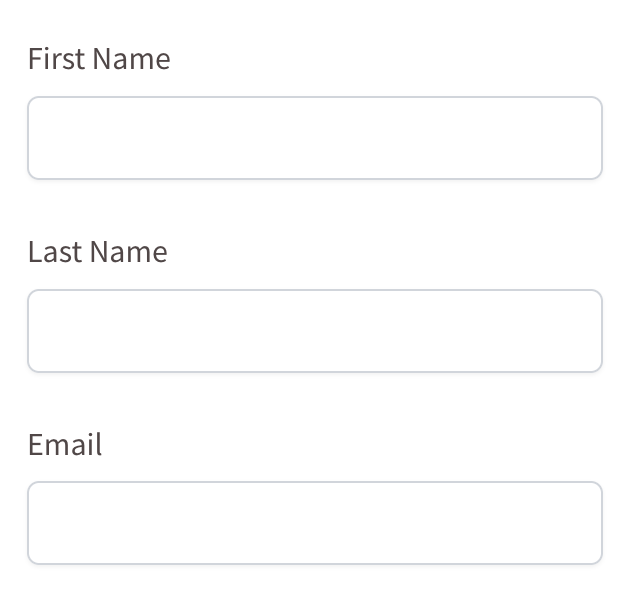
This will generate a Form.io schema with text fields for firstName, lastName, and email.
::: tip
You can play with Formio builder to see the generated schema in
action: [Form.io Builder](https://formio.tsed.dev/?path=/story/reactformio-formbuilder--sandbox\&globals=backgrounds.grid:!false).
:::
## Decorators
### Form
The [Form](/ai/api/third-parties/schema-formio/types/decorators/decorator-form.md) decorator is used to mark a class as a Form.io form. It's required for the `getFormioSchema` function to
work properly.
```typescript
import {Form} from "@tsed/schema-formio";
@Form()
export class User {
// properties
}
```
### Component
The [Component](/ai/api/third-parties/schema-formio/types/decorators/decorator-component.md) decorator allows you to define any extra Form.io metadata on a decorated property:
::: code-group
```typescript [Example]
import {Form, Component} from "@tsed/schema-formio";
import {Property} from "@tsed/schema";
@Form()
export class User {
@Component({
tooltip: "Enter your username",
placeholder: "Username",
description: "Your unique username for the system"
})
@Property()
username: string;
}
```
```json [Generated Schema]
{
"components": [
{
"type": "textfield",
"key": "username",
"label": "Username",
"input": true,
"tooltip": "Enter your username",
"placeholder": "Username",
"description": "Your unique username for the system"
}
],
"display": "form",
"name": "user",
"title": "User",
"type": "form"
}
```
:::
::: tip Note
[Tooltip](/ai/api/third-parties/schema-formio/types/decorators/decorator-tooltip.md), [Placeholder](/ai/api/third-parties/schema-formio/types/decorators/decorator-placeholder.md), and [Description](/ai/api/specs/schema/types/decorators/common/decorator-description.md) decorators can also be used directly on properties to achieve the same
effect.
:::
### Currency
The [Currency](/ai/api/third-parties/schema-formio/types/decorators/decorator-currency.md) decorator changes a property to a Currency component:
::: code-group
```typescript [Example]
import {Form, Currency} from "@tsed/schema-formio";
import {Property} from "@tsed/schema";
@Form()
export class Product {
@Property()
name: string;
@Currency()
@Property()
price: number;
}
```
```json [Generated Schema]
{
"components": [
{
"type": "textfield",
"key": "name",
"label": "Name",
"input": true
},
{
"type": "currency",
"key": "price",
"label": "Price",
"input": true,
"currency": "USD",
"delimiter": true,
"allowNegative": false
}
],
"display": "form",
"name": "product",
"title": "Product",
"type": "form"
}
```
:::
### DataSourceJson
The [DataSourceJson](/ai/api/third-parties/schema-formio/types/decorators/decorator-data-source-json.md) decorator adds a custom data source for a Select component:
```typescript
import {Form, DataSourceJson, Select} from "@tsed/schema-formio";
import {Property} from "@tsed/schema";
@Form()
export class User {
@Select()
@DataSourceJson([
{value: "admin", label: "Administrator"},
{value: "user", label: "Regular User"},
{value: "guest", label: "Guest"}
])
@Property()
role: string;
}
```
### DataSourceUrl
The [DataSourceUrl](/ai/api/third-parties/schema-formio/types/decorators/decorator-data-source-url.md) decorator fetches data source from an endpoint for a Select component:
```typescript
import {Form, DataSourceUrl, Select} from "@tsed/schema-formio";
import {Property} from "@tsed/schema";
@Form()
export class User {
@Select()
@DataSourceUrl("/api/roles")
@Property()
role: string;
}
```
### Hidden
The [Hidden](/ai/api/third-parties/schema-formio/types/decorators/decorator-hidden.md) decorator changes the property to a Hidden component:
```typescript
import {Form, Hidden} from "@tsed/schema-formio";
import {Property} from "@tsed/schema";
@Form()
export class User {
@Hidden()
@Property()
id: string;
@Property()
name: string;
}
```
### InputTags
The [InputTags](/ai/api/third-parties/schema-formio/types/decorators/decorator-input-tags.md) decorator changes the property to an InputTags component:
```typescript
import {Form, InputTags} from "@tsed/schema-formio";
import {Property, CollectionOf} from "@tsed/schema";
@Form()
export class Article {
@Property()
title: string;
@InputTags()
@CollectionOf(String)
@Property()
tags: string[];
}
```
### Label
The [Label](/ai/api/third-parties/schema-formio/types/decorators/decorator-label.md) decorator customizes the label for a component:
```typescript
import {Form, Label} from "@tsed/schema-formio";
import {Property} from "@tsed/schema";
@Form()
export class User {
@Label("First Name")
@Property()
firstName: string;
@Label("Last Name")
@Property()
lastName: string;
}
```
### Mask
The [Mask](/ai/api/third-parties/schema-formio/types/decorators/decorator-mask.md) decorator adds an input mask to a component:
```typescript
import {Form, Mask} from "@tsed/schema-formio";
import {Property} from "@tsed/schema";
@Form()
export class User {
@Mask("(999) 999-9999")
@Property()
phoneNumber: string;
@Mask("99/99/9999")
@Property()
birthDate: string;
}
```
### MaxWords
The [MaxWords](/ai/api/third-parties/schema-formio/types/decorators/decorator-max-words.md) decorator sets the maximum number of words for a text component:
```typescript
import {Form, MaxWords, Textarea} from "@tsed/schema-formio";
import {Property} from "@tsed/schema";
@Form()
export class Article {
@Property()
title: string;
@Textarea()
@MaxWords(100)
@Property()
summary: string;
}
```
### MinWords
The [MinWords](/ai/api/third-parties/schema-formio/types/decorators/decorator-min-words.md) decorator sets the minimum number of words for a text component:
```typescript
import {Form, MinWords, Textarea} from "@tsed/schema-formio";
import {Property} from "@tsed/schema";
@Form()
export class Article {
@Property()
title: string;
@Textarea()
@MinWords(10)
@Property()
summary: string;
}
```
### ModalEdit
The [ModalEdit](/ai/api/third-parties/schema-formio/types/decorators/decorator-modal-edit.md) decorator enables modal editing for a component:
```typescript
import {Form, ModalEdit} from "@tsed/schema-formio";
import {Property} from "@tsed/schema";
@Form()
export class User {
@ModalEdit()
@Property()
profile: object;
}
```
### Multiple
The [Multiple](/ai/api/third-parties/schema-formio/types/decorators/decorator-multiple.md) decorator sets the multiple flag on a property:
```typescript
import {Form, Multiple, Select} from "@tsed/schema-formio";
import {Property, CollectionOf} from "@tsed/schema";
@Form()
export class User {
@Select()
@Multiple()
@CollectionOf(String)
@Property()
roles: string[];
}
```
### OpenWhenEmpty
The [OpenWhenEmpty](/ai/api/third-parties/schema-formio/types/decorators/decorator-open-when-empty.md) decorator makes a component open when it's empty:
```typescript
import {Form, OpenWhenEmpty} from "@tsed/schema-formio";
import {Property} from "@tsed/schema";
@Form()
export class User {
@OpenWhenEmpty()
@Property()
comments: string;
}
```
### Password
The [Password](/ai/api/third-parties/schema-formio/types/decorators/decorator-password.md) decorator changes the property to an input Password component:
```typescript
import {Form, Password} from "@tsed/schema-formio";
import {Property} from "@tsed/schema";
@Form()
export class User {
@Property()
email: string;
@Password()
@Property()
password: string;
}
```
### Placeholder
The [Placeholder](/ai/api/third-parties/schema-formio/types/decorators/decorator-placeholder.md) decorator adds a placeholder to a component:
```typescript
import {Form, Placeholder} from "@tsed/schema-formio";
import {Property} from "@tsed/schema";
@Form()
export class User {
@Placeholder("Enter your email")
@Property()
email: string;
@Placeholder("Enter your password")
@Property()
password: string;
}
```
### Prefix
The [Prefix](/ai/api/third-parties/schema-formio/types/decorators/decorator-prefix.md) decorator adds a prefix to a component:
```typescript
import {Form, Prefix} from "@tsed/schema-formio";
import {Property} from "@tsed/schema";
@Form()
export class Product {
@Property()
name: string;
@Prefix("$")
@Property()
price: number;
}
```
### Select()
The [Select](/ai/api/third-parties/schema-formio/types/decorators/decorator-select.md) decorator changes the property to a Select component:
```typescript
import {Form, Select} from "@tsed/schema-formio";
import {Property, Enum} from "@tsed/schema";
export enum UserRole {
ADMIN = "admin",
USER = "user",
GUEST = "guest"
}
@Form()
export class User {
@Property()
name: string;
@Select()
@Enum(UserRole)
@Property()
role: UserRole;
}
```
### Suffix
The [Suffix](/ai/api/third-parties/schema-formio/types/decorators/decorator-suffix.md) decorator adds a suffix to a component:
```typescript
import {Form, Suffix} from "@tsed/schema-formio";
import {Property} from "@tsed/schema";
@Form()
export class Product {
@Property()
weight: number;
@Suffix("kg")
@Property()
weight: number;
}
```
### TableView
The [TableView](/ai/api/third-parties/schema-formio/types/decorators/decorator-table-view.md) decorator controls whether a property is displayed in a table view:
```typescript
import {Form, TableView} from "@tsed/schema-formio";
import {Property} from "@tsed/schema";
@Form()
export class User {
@TableView(true)
@Property()
name: string;
@TableView(false)
@Property()
password: string;
}
```
### Tabs
The [Tabs](/ai/api/third-parties/schema-formio/types/decorators/decorator-tabs.md) decorator groups properties using the Form.io tab component:
```typescript
import {Form, Tabs} from "@tsed/schema-formio";
import {Property} from "@tsed/schema";
@Form()
export class User {
@Tabs("Basic Information")
@Property()
firstName: string;
@Tabs("Basic Information")
@Property()
lastName: string;
@Tabs("Contact Information")
@Property()
email: string;
@Tabs("Contact Information")
@Property()
phone: string;
@Tabs("Security")
@Property()
password: string;
}
```
### Textarea
The [Textarea](/ai/api/third-parties/schema-formio/types/decorators/decorator-textarea.md) decorator changes a component to a Textarea component:
```typescript
import {Form, Textarea} from "@tsed/schema-formio";
import {Property} from "@tsed/schema";
@Form()
export class Article {
@Property()
title: string;
@Textarea()
@Property()
content: string;
}
```
### TextCase
The [TextCase](/ai/api/third-parties/schema-formio/types/decorators/decorator-text-case.md) decorator sets the text case for a component:
```typescript
import {Form, TextCase} from "@tsed/schema-formio";
import {Property} from "@tsed/schema";
@Form()
export class User {
@TextCase("uppercase")
@Property()
code: string;
@TextCase("lowercase")
@Property()
email: string;
}
```
### Tooltip
The [Tooltip](/ai/api/third-parties/schema-formio/types/decorators/decorator-tooltip.md) decorator adds a tooltip to a component:
```typescript
import {Form, Tooltip} from "@tsed/schema-formio";
import {Property} from "@tsed/schema";
@Form()
export class User {
@Tooltip("Enter your full name")
@Property()
name: string;
@Tooltip("Enter a valid email address")
@Property()
email: string;
}
```
### Validate
The [Validate](/ai/api/third-parties/schema-formio/types/decorators/decorator-validate.md) decorator adds custom validation to a component:
```typescript
import {Form, Validate} from "@tsed/schema-formio";
import {Property} from "@tsed/schema";
@Form()
export class User {
@Validate({
required: true,
minLength: 3,
maxLength: 50
})
@Property()
username: string;
@Validate({
required: true,
pattern: "^[^\\s@]+@[^\\s@]+\\.[^\\s@]+$"
})
@Property()
email: string;
}
```
## Combining Decorators
You can combine multiple decorators to customize your Form.io components:
```typescript
import {Form, Select, DataSourceJson, Placeholder, Required, Tooltip} from "@tsed/schema-formio";
import {Property} from "@tsed/schema";
@Form()
export class User {
@Property()
@Required()
@Tooltip("Enter your full name")
@Placeholder("John Doe")
name: string;
@Select()
@DataSourceJson([
{value: "admin", label: "Administrator"},
{value: "user", label: "Regular User"},
{value: "guest", label: "Guest"}
])
@Required()
@Property()
role: string;
}
```
## Complete Example
Here's a more complete example showing how to use various decorators together:
```typescript
import {Form, Tabs, InputTags, Password, Textarea, Select, TableView, Placeholder, Tooltip} from "@tsed/schema-formio";
import {Property, Required, Email, MinLength, MaxLength, CollectionOf, Enum} from "@tsed/schema";
export enum UserRole {
ADMIN = "admin",
USER = "user",
GUEST = "guest"
}
@Form()
export class User {
// Basic Information Tab
@Tabs("Basic Information")
@Required()
@Property()
firstName: string;
@Tabs("Basic Information")
@Required()
@Property()
lastName: string;
@Tabs("Basic Information")
@Select()
@Enum(UserRole)
@Required()
@Property()
role: UserRole;
// Contact Information Tab
@Tabs("Contact Information")
@Required()
@Email()
@Placeholder("example@email.com")
@Tooltip("Enter a valid email address")
@Property()
email: string;
@Tabs("Contact Information")
@Property()
phone: string;
@Tabs("Contact Information")
@Textarea()
@Property()
address: string;
// Security Tab
@Tabs("Security")
@Password()
@Required()
@MinLength(8)
@MaxLength(50)
@Placeholder("Enter a strong password")
@Property()
password: string;
// Preferences Tab
@Tabs("Preferences")
@InputTags()
@CollectionOf(String)
@TableView(true)
@Property()
interests: string[];
@Tabs("Preferences")
@Textarea()
@Property()
bio: string;
}
// Generate the Form.io schema
const formioSchema = await getFormioSchema(User);
```
This example creates a form with four tabs (Basic Information, Contact Information, Security, and Preferences) and
various field types with different validations and customizations as follows:

## Conclusion
The `@tsed/schema-formio` package provides a powerful way to generate Form.io schemas from TypeScript classes using
decorators. By combining decorators from both `@tsed/schema` and `@tsed/schema-formio`, you can create complex forms
with various field types, validations, and customizations.
It becomes easy to maintain your forms alongside your TypeScript models, ensuring type safety and consistency across
Ts.ED applications.